Maintenance Edge-Proxy
The Maintenance Edge-Proxy (“edge”) is a ReadyStackGo-managed reverse-proxy container that runs per product in front of its public entry. It survives product redeploys and — driven by RSGO’s authoritative deploy state and the maintenance flag — either proxies transparently to the upstream or serves a controlled maintenance page plus a machine-readable status.
The feature is opt-in per product (via the manifest) and dormant by default: without an edge: block nothing changes about the existing behaviour.
Why this feature exists
Section titled “Why this feature exists”During a redeploy or maintenance, RSGO removes the product containers — including the single public entry (e.g. the BFF/gateway). Clients and browsers then get “connection refused” instead of a meaningful page, and launchers/clients have no reliable way to tell why the service is down.
The edge closes that gap and cleanly separates two layers:
| Layer | Responsibility | Solved by |
|---|---|---|
| Control plane | ”Should the service be in maintenance?” — the toggle | Maintenance Mode (flag/observer) — already present |
| Experience plane | ”What does the client see while the service is down?” | Maintenance Edge-Proxy (this page) |
Benefits:
- No more connection-refused during redeploy or maintenance — the edge stays reachable throughout.
- Controlled maintenance page instead of a browser error page, fully customizable.
- Machine-readable status (
GET /__status) so a launcher/client can robustly tell “running”, “maintenance” or “deploying”. - Generic: nothing product-specific — each product enables it via the manifest only.
How it works (for developers)
Section titled “How it works (for developers)”RSGO runs the edge as a separate container (Caddy) managed in its lifecycle — it does not run inside the RSGO process (clean control/data-plane separation; an RSGO self-update causes no traffic blip).
Routing — from authoritative state, not guessed
Section titled “Routing — from authoritative state, not guessed”The edge does not health-guess. Its only inputs are RSGO’s deploy state (ProductDeployment.Status) and the maintenance flag (OperationMode):
| Deploy state | Maintenance flag | Edge behaviour | /__status state |
|---|---|---|---|
Running | off | Transparent proxy to the upstream | running |
Running | on | Maintenance page, planned maintenance | maintenance |
Deploying / Redeploying / Upgrading | any | Maintenance page, temporarily unavailable | deploying |
Failed / Stopped / other | off | Maintenance page, temporarily unavailable | maintenance |
The flag only changes the wording (planned maintenance vs. temporarily down); whether to proxy is decided purely by the deploy state.
Survival — the edge outlives the redeploy
Section titled “Survival — the edge outlives the redeploy”When tearing down a stack, RSGO removes all containers with the matching stack label. The edge (and an optional product-contributed maintenance container) carry survival labels and are excluded:
| Label | Value | Meaning |
|---|---|---|
rsgo.scope | edge | Container belongs to the edge scope → excluded from stack teardown |
rsgo.redeploy | ignore | Generic opt-out → excluded from stack teardown |
rsgo.role | maintenance-page | Product-contributed maintenance container (see below) |
RSGO is also the single writer of the edge config: it computes the desired state and pushes it atomically and connection-preservingly via the Caddy admin API (POST /load) — without restarting the edge.
Step by step: enabling the edge
Section titled “Step by step: enabling the edge”Step 1: Add the edge: block to the product manifest
Section titled “Step 1: Add the edge: block to the product manifest”Add the optional product-level edge: block (sibling of metadata: / services:). The upstream service must be attached to the shared external network so the edge can reach it by DNS alias:
metadata:  name: ams.project  productVersion: "1.0.0"
networks:  ams-project-edge-net:    external: true            # shared network edge <-> upstream
services:  web-bff:                    # public entry (BFF/gateway)    image: ams/bff:1.0.0    networks: [ams-project-edge-net]
edge:  enabled: true  publicHostname: project.customer.tld  publicPort: 443  upstream:    service: web-bff          # = service/alias name on the network    port: 8080  network: ams-project-edge-net  tls:    mode: selfsigned  maintenancePage:    mode: default    branding:      productName: "ams.project"      supportContact: support@customer.tld      locales: [de, en]
Step 2: Deploy the product
Section titled “Step 2: Deploy the product”Deploy as usual. RSGO detects the edge: block, provisions the edge container, and switches it to proxy once the product is Running. In normal operation the edge passes through transparently.
Step 3: Observe the behaviour
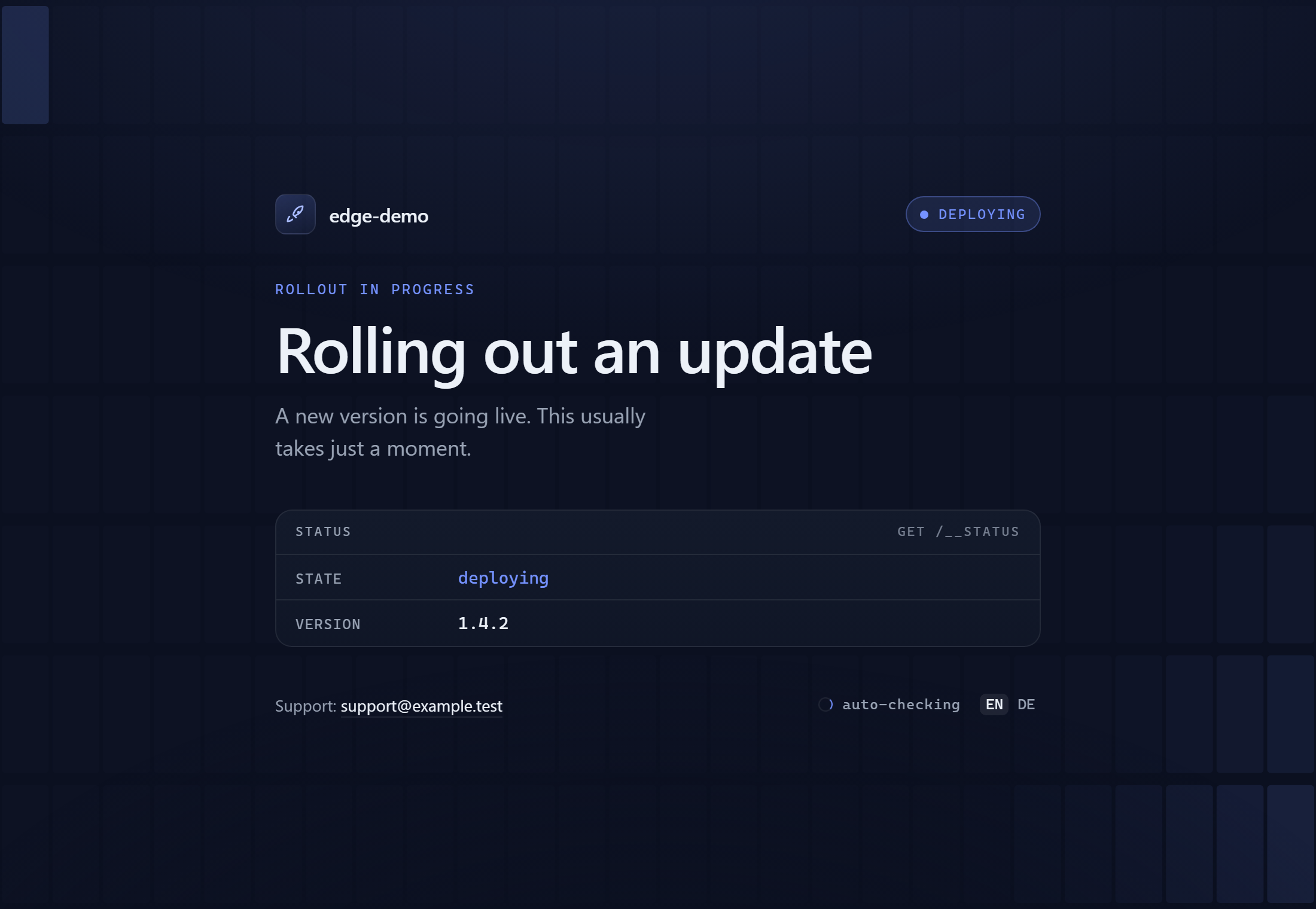
Section titled “Step 3: Observe the behaviour”During a redeploy the edge stays up and serves the maintenance page (state: deploying) — no connection-refused:
With the maintenance flag set it shows the planned-maintenance variant including the reason:
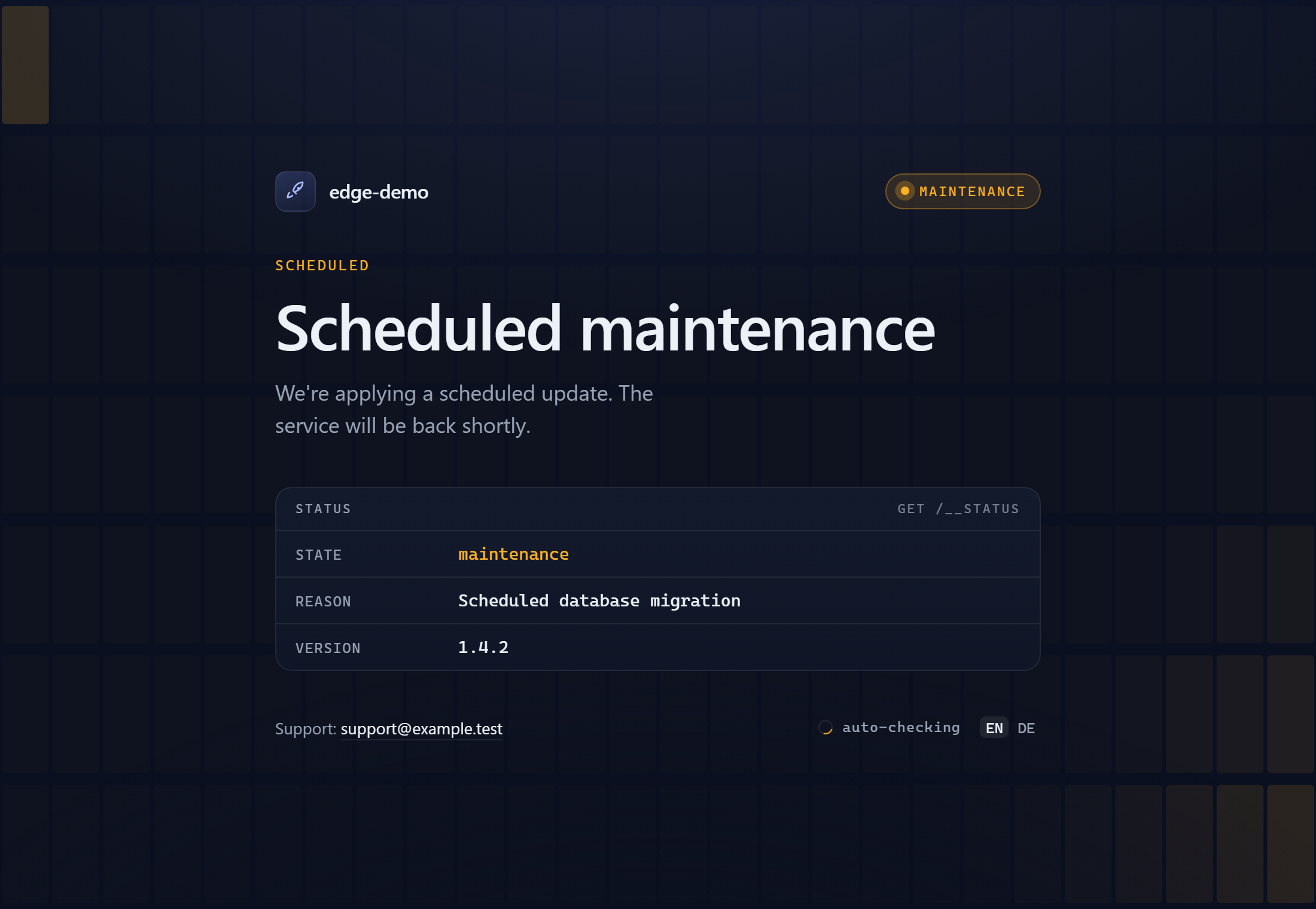
The page renders the live /__status contract directly as a status panel, auto-refreshes every few seconds, and reloads into the app automatically as soon as the product reports running — visitors never have to reload by hand. The accent colour follows the state (amber for maintenance, blue for a rollout).
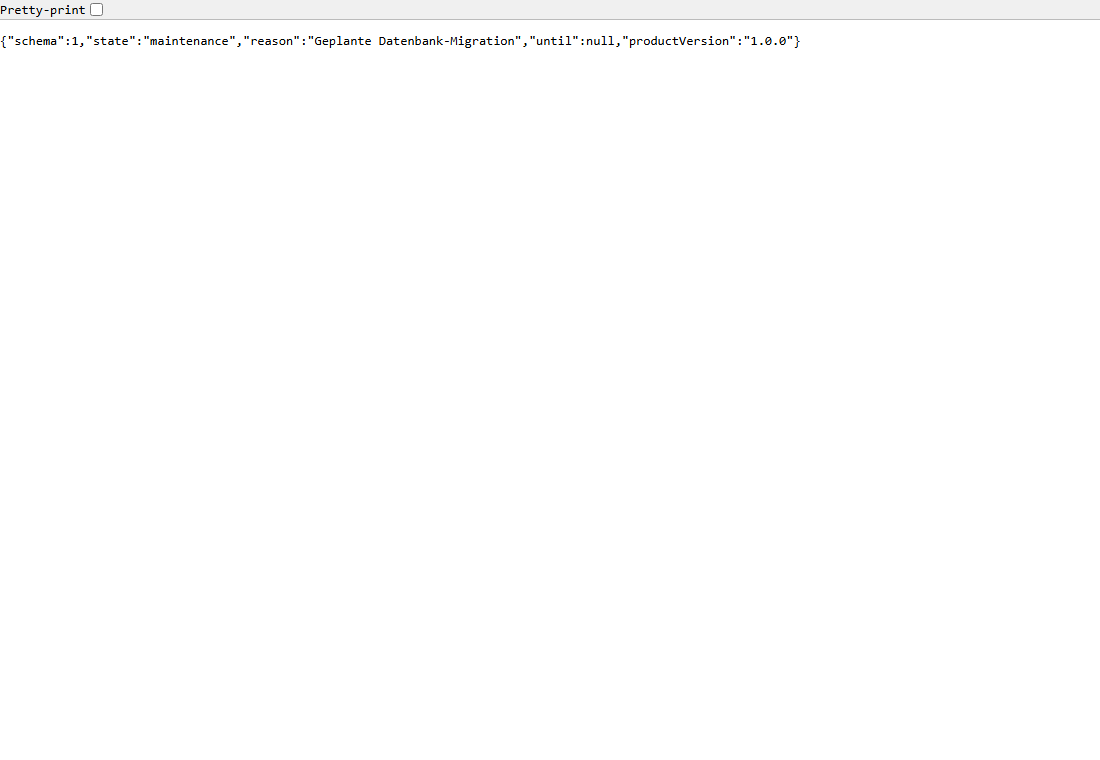
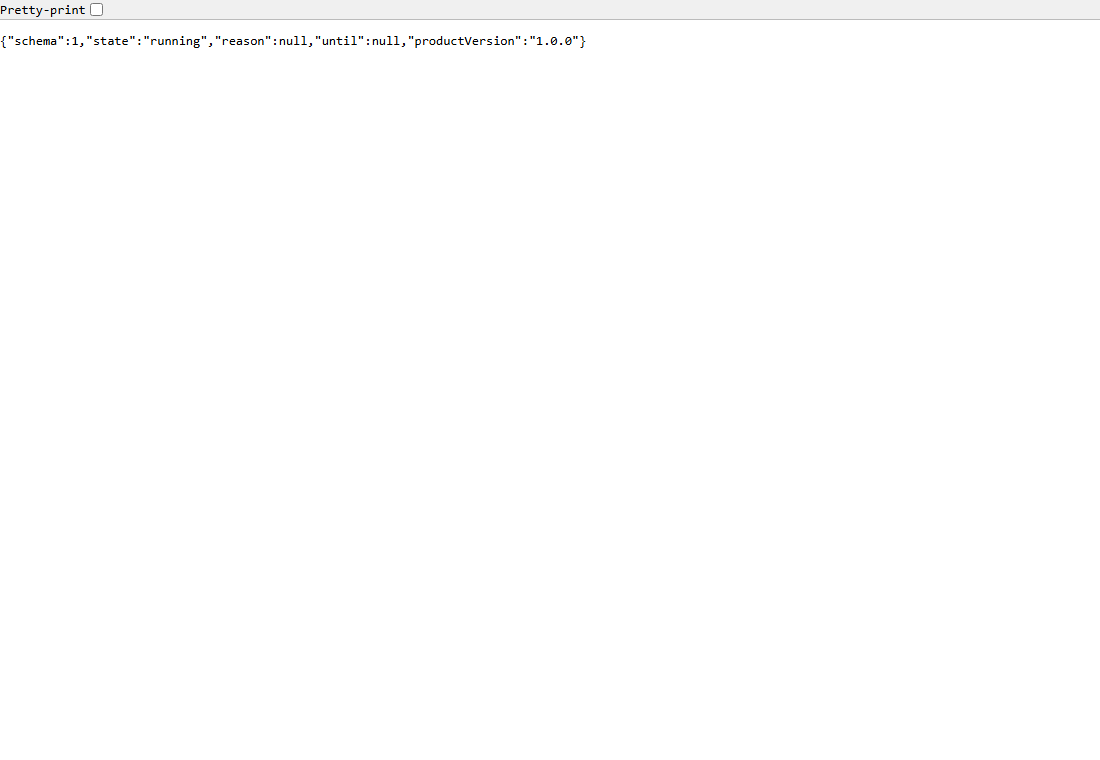
The machine-readable status at /__status distinguishes the states unambiguously:
a) Customizing the maintenance page
Section titled “a) Customizing the maintenance page”There are three stages. The edge resolves them in the order container → bundle → default, falling back to the next stage.
Default page (branding variables)
Section titled “Default page (branding variables)”maintenancePage.mode: default serves the built-in page — a live status panel in RSGO’s brand colours that mirrors the /__status contract (state, reason, version), polls for updates and switches users back to the app automatically once it is running. Customize it without any HTML via branding:
maintenancePage: mode: default branding: productName: "ams.project" logoUrl: https://customer.tld/logo.svg supportContact: support@customer.tld locales: [de, en]| Field | Description |
|---|---|
productName | Display name on the page / in the browser tab |
logoUrl | Optional logo (absolute URL) |
supportContact | Optional support address shown at the bottom |
locales | Languages for the on-page toggle (e.g. [de, en]) |
Your own HTML (bundle)
Section titled “Your own HTML (bundle)”maintenancePage.mode: bundle serves your own HTML page inline. RSGO reads it at deploy time from the manifest repository (bundlePath/index.html):
maintenancePage: mode: bundle bundlePath: ./maintenance/ # reads ./maintenance/index.htmlb) Replacing it with your own container (full control)
Section titled “b) Replacing it with your own container (full control)”For full customizability (own assets, dynamic content, your own web server) the product ships its own maintenance container that the edge proxies to during maintenance.
How:
- Set
maintenancePage.mode: containerand specify service + port. - Label the maintenance service
rsgo.role: maintenance-pageandrsgo.redeploy: ignore(so it survives redeploys, like the edge). - Attach the service to the shared edge network so the edge can reach it by alias.
networks:  ams-project-edge-net:    external: true
services:  maintenance-web:    image: ams/maintenance-page:1.0    networks: [ams-project-edge-net]    labels:      rsgo.role: maintenance-page      rsgo.redeploy: ignore          # survives the redeploy
edge:  enabled: true  publicHostname: project.customer.tld  upstream: { service: web-bff, port: 8080 }  network: ams-project-edge-net  maintenancePage:    mode: container    container:      service: maintenance-web       # = alias on the network      port: 80
During maintenance the edge forwards catch-all requests to maintenance-web:80. The GET /__status contract and the /hc passthrough stay unchanged — only the visible page comes from your container.
Ready-made templates (examples in the repo)
Section titled “Ready-made templates (examples in the repo)”The repository ships a ready-to-use template for both customization paths under examples/edge-maintenance/:
| Variant | Contents | Folder |
|---|---|---|
| Bundle | A self-contained, branded index.html + manifest snippet | bundle/ |
| Container | Dockerfile (nginx:alpine), assets (index.html, styles.css, logo.svg, status.js) + manifest snippet | container/ |
The example container (examples/edge-maintenance/container/) is a minimal nginx:alpine serving the html/ directory. Build and push it like this:
cd examples/edge-maintenance/containerdocker build -t your-registry/ams-maintenance-page:1.0 .docker push your-registry/ams-maintenance-page:1.0Then reference the image in your manifest under maintenance-web (see the snippet above) and replace the assets in html/ with your own — the web server and port are up to you.
Live status: both templates poll /__status (same origin behind the edge) via a small script (status.js / inline). The page automatically switches its wording between “planned maintenance” and “deploying” and reloads once the product is running again.
Manifest reference: the edge: block
Section titled “Manifest reference: the edge: block”| Field | Required | Default | Description |
|---|---|---|---|
enabled | yes | false | Master switch. false/absent → feature inert. |
publicHostname | yes | — | Hostname the edge serves (certificate CN; SNI key). |
publicPort | no | 443 | Public port the edge listens on. |
image | no | pinned caddy | Edge image; pin a digest in production. |
upstream.service | yes | — | Internal DNS alias of the public entry (e.g. the BFF). |
upstream.port | no | 8080 | Upstream port. |
network | yes | — | Shared external network connecting edge and upstream (external: true). |
mss | no | pmtu | Client-facing TCP segment sizing for VPN robustness: pmtu (adaptive, default), a fixed number (e.g. 1360), or off. See VPN robustness below. |
tls.mode | no | none | TLS termination: selfsigned, custom (certRef), reuse (RSGO cert), letsencrypt. |
tls.certRef | for custom | — | Reference to the uploaded certificate. |
tls.letsencrypt.email / .dnsChallenge | for letsencrypt | — | ACME settings. |
maintenancePage.mode | no | default | default, bundle, or container. |
maintenancePage.bundlePath | for bundle | — | Asset directory in the manifest repo (index.html). |
maintenancePage.container.service / .port | for container | 80 | Service alias + port of the maintenance container. |
maintenancePage.branding.* | no | — | productName, logoUrl, supportContact, locales. |
TLS termination
Section titled “TLS termination”When tls.mode is set, the edge terminates HTTPS on publicPort with a certificate that RSGO manages — the edge never runs ACME itself. Renewed certificates are reloaded without an edge restart.
tls.mode | Certificate source |
|---|---|
selfsigned | RSGO generates a per-hostname self-signed cert and auto-renews it. |
custom | Operator-provided certificate (certRef). |
reuse | RSGO’s own endpoint certificate (single-host case). |
letsencrypt | Uses RSGO’s ACME-managed certificate. |
Full schema details: RSGo Manifest Format.
VPN robustness: the mss option
Section titled “VPN robustness: the mss option”The problem
Section titled “The problem”Products hosted behind the edge can be perfectly usable on the LAN yet fail over a VPN: the login (small requests) works, but loading a larger page or a big start-up configuration ends in an HTTP 502 or a timeout.
The cause is not the server — it is the path. A VPN tunnel wraps every packet in an extra header, which lowers the usable packet size (MTU). Normally the network signals “packet too large” back to the sender (Path MTU Discovery), but many corporate VPNs filter that ICMP message. Large response packets (sent with the don’t-fragment bit set) are then dropped silently — small transfers still fit, large ones stall. This is a classic PMTU blackhole.
Because the edge terminates the client TCP connection and is the public front door, network/MTU robustness belongs here — solved once at the edge, it applies to every RSGO-hosted product at every customer, with no change on the customer’s VPN.
The option
Section titled “The option”edge: enabled: true # ... mss: pmtu # default — you normally do not set this| Value | Behaviour |
|---|---|
pmtu | Default, recommended. Adaptive kernel path-MTU probing (PLPMTUD, RFC 4821): the edge detects a blackhole on large responses and shrinks its TCP segment size on its own — without relying on the (filtered) ICMP message and without a guessed fixed value. Harmless on the LAN (full segment size when the path allows it). |
a number, e.g. 1360 | Enforce a fixed maximum segment size. Use only if you must pin an exact value; valid range 536–1460. Applied by lowering the edge network’s MTU to mss + 40. |
off | Disable the feature entirely — the edge keeps the OS default (the behaviour before this option existed). Backward-compatibility escape hatch. |
If mss is absent, invalid, or out of range, the edge falls back to pmtu — an unusable front door is worse than an ignored tuning value.
Security note: no elevated privileges
Section titled “Security note: no elevated privileges”The default (pmtu) is implemented with namespaced kernel sysctls (net.ipv4.tcp_mtu_probing, net.ipv4.tcp_base_mss) set only on the edge container. The fixed mode lowers the edge network MTU. Neither mode requires the NET_ADMIN capability or any change to the container image — the edge runs with the same privileges as before.
Fixed-mode caveat: a fixed MSS is applied when RSGO creates the edge network. If the network already exists (e.g. it was created by the product stack first) its MTU cannot be changed without recreating it; RSGO logs a warning and the fixed cap does not take effect. In that case, prefer
pmtu(which works regardless of who owns the network) or let RSGO create the network.
When a change takes effect
Section titled “When a change takes effect”Sysctls and the network MTU are create-time container settings — they cannot be changed on a running container. On top of that, the edge container deliberately survives every redeploy (label rsgo.redeploy=ignore) so the maintenance page stays reachable while the product is down.
So a changed mss value reaches a running deployment like this:
- Redeploy and upgrade re-read the
edge:block from the manifest and compare the configured tuning against the one the live edge container was created with (labelrsgo.edge.mss). On a mismatch the edge container is recreated once — before the product stacks are touched. The front door is unreachable for a few seconds, at a point where the product is being redeployed anyway. - The background reconciler does not do this. It only keeps the edge alive and pushes Caddy config; it never restarts the front door on its own.
- An edge container from an RSGO version older than this option carries no label and no tuning — it counts as
offand is switched to the configured mode (pmtuby default) on the next redeploy/upgrade. - For a fixed value the network caveat above still applies: a fresh container alone does not change the MTU of an existing network.
Verifying that clamping is actually in effect
Section titled “Verifying that clamping is actually in effect”At startup the edge container logs one line with the values it reads from its own kernel — so you can tell at a customer site whether the container really got updated:
docker logs <deployment>-edge 2>&1 | head -1# rsgo-edge: client-facing MSS tuning mode=pmtu verdict=ACTIVE (expected: tcp_mtu_probing=1 | tcp_mtu_probing=1 tcp_base_mss=1024 iface_mtu: eth0=1500 eth1=1500)verdict | Meaning |
|---|---|
ACTIVE | The configured mode is in effect inside the container. |
DISABLED | mss: off — no tuning by choice. |
INACTIVE | The container is not running the configured mode (e.g. it predates the setting, or a fixed MTU could not be applied to the existing network) → run a redeploy, or check the network caveat. |
The label additionally shows which mode the container was created with:
docker inspect -f '{{index .Config.Labels "rsgo.edge.mss"}}' <deployment>-edgeStatus contract: GET /__status
Section titled “Status contract: GET /__status”The edge serves a stable, versioned JSON at /__status — identical across all branding modes so a client/launcher can parse it robustly:
{ "schema": 1, "state": "running", "reason": null, "until": null, "productVersion": "1.0.0"}| Field | Meaning |
|---|---|
schema | Contract version. Consumers should branch on it. |
state | running (proxying), maintenance (planned, reason set), or deploying (redeploy/upgrade in progress). |
reason | Planned-maintenance reason (from the flag), else null. |
until | Announced end (ISO-8601) when available, else null. |
productVersion | Current product version when known. |
This lets a client reliably distinguish “planned maintenance” (flag) from “redeploy/temporarily down” (deploy state) — without guessing.
Related topics
Section titled “Related topics”- Maintenance Mode — the toggle (control plane) that drives the edge.
- Product Redeploy — during which the edge holds the fort.
- RSGo Manifest Format — full manifest reference.